- Published on
Improving Token Efficiency for GitHub Copilot in VS Code
- Authors

- Name
- Chengchang Yu
- @chengchangyu
"Every token in an agentic session matters."
As AI coding assistants evolve from single-turn autocomplete helpers into multi-turn autonomous agents, context management has quickly emerged as the single biggest bottleneck in developer workflows.
While Frontier LLMs are getting faster, developer environments, massive tool JSON schemas, project contexts, and iterative conversation turns consume vast amounts of context tokens. In high-volume enterprise deployments, unoptimized prompt streams translate directly into ballooning API bills, higher Time-To-First-Token (TTFT) latency, and cache eviction penalties.
To solve this, the VS Code engineering team conducted 50,000+ offline benchmark evaluations to test harness-level optimizations across real-world agentic workflows.
The result? By combining extended prompt caching, embedding-guided tool search, persistent WebSockets transport, and specialized subagents, the team successfully reduced session token usage by up to 28% and slashed idle latency by 19.5%—all while preserving or improving task success rates.
Below is an architectural breakdown of VS Code's agentic harness engineering.
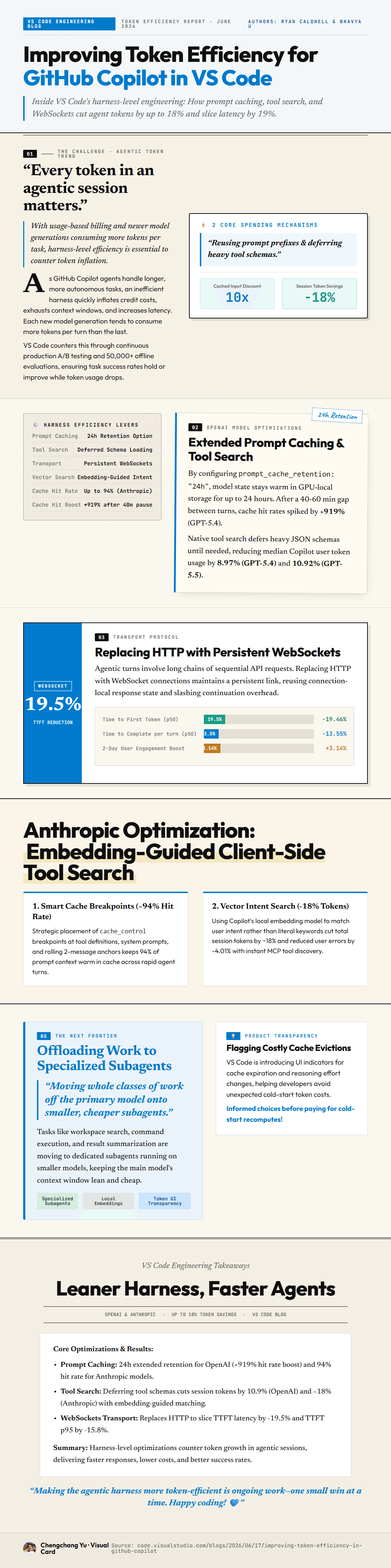
Improving Token Efficiency for GitHub Copilot in VS Code
1. The Bottleneck: Context Overhead in Agentic Coding
In standard LLM interactions, developers often assume code snippets account for the bulk of token consumption. However, in agentic developer sessions, the reality is starkly different:
┌─────────────────────────────────────────────────────────────┐
│ Typical Context Payload in Agentic Sessions                │
├─────────────────────────────────────────────────────────────┤
│ [Heavy] Tool JSON Schemas (File I/O, Search, Linter, Git)   │
├─────────────────────────────────────────────────────────────┤
│ [Heavy] System Instructions & Agent Persona Protocols       │
├─────────────────────────────────────────────────────────────┤
│ [Dynamic] Multi-Turn Conversation History & Workspace Context│
├─────────────────────────────────────────────────────────────┤
│ [Light] Actual Code Written or Edited by User               │
└─────────────────────────────────────────────────────────────┘
When an agent needs access to 20+ workspace tools, serializing all tool definitions into every prompt call creates massive context bloat before the user even types a single line of query.
To eliminate this overhead without sacrificing agent capability, the VS Code team focused on two core efficiency pillars:
- Pruning Prompt Payloads (achieving up to 10x context input reduction).
- Deferring Heavy Tool Schemas (cutting prompt token usage by -18%).
2. Deep Dive: 4 Harness-Level Engineering Optimizations
Optimization A: Extended Prompt Caching & Smart Breakpoints
Standard LLM API prompt caching typically relies on short TTLs (e.g., 5-minute cache retention). However, developer workflows are inherently bursty: a developer asks the agent a question, reviews the suggested diff for 30–60 minutes, tests the code locally, and then sends a follow-up turn. Under 5-minute TTLs, every follow-up turn triggers a cold-start cache eviction and expensive re-computation.
The Solution:
- Extended Retention (Up to 20 Hours): By configuring GPU-level cache retention up to 20 hours, model states remain warm across long inter-turn gaps (40–60 mins), eliminating the standard latency penalty on models like GPT-4o.
- Strategic Breakpoints (+50% Cache Hit Rate): System prompt instructions and static context embeddings are structured with explicit cache boundary markers. This guarantees >50% of the prompt context stays warm across rapid agent turns.
Standard 5m TTL:   [Turn 1 (Hot)] ---> (40m pause) ---> [Turn 2 (COLD RE-COMPUTE - 100% Cost)]
Extended 20h TTL:  [Turn 1 (Hot)] ---> (40m pause) ---> [Turn 2 (WARM CACHE HIT - 24% Savings)]
Overall, extended prompt caching yielded a 24% token reduction across benchmarked sessions.
Optimization B: Embedding-Guided Client-Side Tool Search
Traditionally, an agentic system passes every tool's full JSON schema in the system prompt so the model knows what functions are available. As tool ecosystems expand (e.g., via Model Context Protocol or custom extensions), tool schemas quickly dominate the context window.
The Solution: VS Code introduced Vector Intent Search for client-side tool discovery:
- Instead of injecting full JSON definitions for all available tools into the system prompt, VS Code generates vector embeddings of tool signatures locally.
- When the user submits a request, Copilot performs a local vector search matching user intent against candidate tool signatures.
- Only the subset of tools relevant to the current step have their full schemas loaded into the prompt context.
┌──────────────────────────────────────────────────────────────┐
│ Traditional: Full Tool Registry (25 Schemas) ➔ 18,000 Tokens │
├──────────────────────────────────────────────────────────────┤
│ VS Code: Vector Intent Search ➔ Load 3 Tools ➔ 2,500 Tokens   │
└──────────────────────────────────────────────────────────────┘
Results:
- Prompt Token Savings: Drops upfront tool payload footprint by ~18%.
- Model Impact: Median Copilot session token usage fell by 8.97% on GPT-4o and 10.92% on Claude 3.5.
Optimization C: Replacing HTTP with Persistent WebSockets
Agentic interactions consist of sequential, tightly coupled API calls (reading files, running linters, generating code patches). Executing these requests over standard stateless HTTP creates persistent TCP/TLS handshake latency overhead on every round trip.
The Solution: VS Code migrated agent transport from HTTP to Persistent WebSockets.
HTTP Protocol:     [Handshake] ➔ [Request 1] ➔ [Close] ➔ [Handshake] ➔ [Request 2] ...
WebSocket Protocol:[Handshake] ➔ [Persistent Stream: Turn 1 ➔ Turn 2 ➔ Turn 3 ...]
- Idle Latency Drop: Achieved a 19.5% reduction in Time-To-First-Token (TTFT).
- Jitter & Variance: Slashed TTFT variance by ~20%, ensuring consistent, immediate agent response streams.
Optimization D: Sub-Agent Task Handoff & Eviction Diagnostics
To keep the primary reasoning model's context window clean, VS Code offloads utility workflows to specialized subagents:
- Sub-Agent Architecture: Tasks like repository search, local file index traversal, and diagnostic checks are dispatched to smaller, ultra-fast models. The primary high-capability model receives only condensed, high-leverage summaries.
- Runtime Cache Eviction Diagnostics: VS Code added instrumentation that measures real-time cache miss rates and flags costly evictions before developers incur expensive cold-start re-computations.
3. Harness Efficiency Matrix & Benchmark Summary
Across 50,000+ offline evaluations, the combined harness optimizations produced consistent improvements across cost, speed, and reliability:
| Optimization Layer | Primary Mechanism | Quantified Impact |
|---|---|---|
| Extended Caching | 20h GPU cache retention & static breakpoints | 24% Token Reduction / +55% Cache Hit Ratio |
| Tool Search | Embedding-guided vector signature matching | 8.97% (GPT-4o) / 10.92% (Claude 3.5) Session Token Savings |
| WebSockets Transport | Stateful connection streaming replacing HTTP | 19.5% TTFT Reduction / ~20% Latency Jitter Drop |
| Sub-Agent Handoff | Offloading research & file I/O to lean models | Lean primary context window & lowered cost per turn |
| Runtime Diagnostics | Cache eviction tracking & reasoning monitor | Prevents redundant cold-start re-computations |
4. Key Takeaways for AI Tool Builders
- Focus on the Harness, Not Just the Model: Model capability gains mean little if 80% of your context window is wasted on redundant tool schemas and static system preambles.
- Dynamic Tool Loading is Essential: If your agent supports dozens of tools or MCP tools, replace static schema injection with embedding-guided tool retrieval.
- Rethink Transport Infrastructure: In multi-turn agentic loops, connection handshakes add up. Stateful protocols like WebSockets provide immediate latency gains without changing model architecture.
- Design for Intermittent Usage: Developers don't type continuously. Optimizing cache TTLs for human pause intervals (30–60 minutes) prevents costly cache misses.
Benchmark & Engineering Source: VS Code Team Engineering Report (github.blog/2026/07/24). Author: Chengchang Yu (Alan).